This is the main interface to the library exposing all multidevice games operations available to a developer. More...
#include <GameBTComms.h>
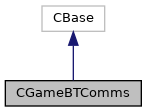
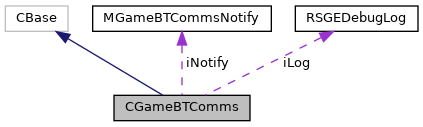
Classes | |
| struct | TMessageQueue |
Public Member Functions | |
StartHostL | |
| IMPORT_C void | StartHostL (TUint16 aStartPlayers, TUint16 aMinPlayers) |
| Set device as a the host. More... | |
StartClientL | |
| IMPORT_C void | StartClientL () |
| Set the device as a client. More... | |
TConnectionRole | |
| IMPORT_C TConnectionRole | ConnectionRole () |
| Indicates whether the device is the host or a client. More... | |
GameState | |
| IMPORT_C TGameState | GameState () |
| Indicates the state of the game. More... | |
ConnectState | |
| IMPORT_C TConnectState | ConnectState () |
| Indicates the state of the connection. More... | |
GetLocalDeviceName | |
| IMPORT_C TInt | GetLocalDeviceName (THostName &aHostName) |
| Gets the name from the user's Bluetooth settings. More... | |
Disconnect | |
| IMPORT_C void | Disconnect () |
| When called from a client, the connection to the host is dropped. More... | |
DisconnectClient | |
| IMPORT_C TInt | DisconnectClient (TUint16 aClientId) |
| Disconnects the client specified. More... | |
SendDataToClient | |
| IMPORT_C TInt | SendDataToClient (TUint16 aClientId, TDesC8 &aData) |
| Performs a synchronous data write operation to the specified client. More... | |
SendDataToAllClients | |
| IMPORT_C TInt | SendDataToAllClients (TDesC8 &aData) |
| Performs a synchronous data broadcast operation to all connected clients. More... | |
SendDataToHost | |
| IMPORT_C TInt | SendDataToHost (TDesC8 &aData) |
| Performs a synchronous data write operation to the host. More... | |
ContinueMultiPlayerGame | |
| IMPORT_C TInt | ContinueMultiPlayerGame () |
| This is called to continue a multiplayer game with the same parties that was paused by receiving a MGameBTCommsNotify::PauseMultiPlayerGame. More... | |
ReconnectL | |
| IMPORT_C TInt | ReconnectL (TBool aMustReconnectToAll=ETrue) |
| This is called to reconnect a disconnected device (for example after the application went into the background). More... | |
PauseMultiPlayerGame | |
| IMPORT_C TInt | PauseMultiPlayerGame () |
| Sets each device's game status to paused. More... | |
EndMultiPlayerGame | |
| IMPORT_C TInt | EndMultiPlayerGame () |
| This is called when a player no longer wishes to be part of the game (no option of continuing allowed). More... | |
NewL | |
| enum | { KMaxPlayers = KBTMaxPlayers } |
| enum | { KServerConnectionId = KBTHostConnectionId } |
| enum | TConnectionRole { EIdle , EClient , EHost } |
| enum | TGameState { EGameOver , EPlay , EPause } |
| enum | TConnectState { ENotConnected , EConnecting , EConnected } |
| enum | TGameCommsState { EInit , ERegisterUID , ERegisterDeviceName , ERegisterNetConfig , ERegisterRole , EHandleMessages } |
| enum | TRecipientId { EToHost = 1 , EToClient1 = 2 , EToClient2 = 3 , EToClient3 = 4 , EToAll = 5 , EInvalid = 0xff } |
| enum | { KMaxQueueSize = 32 , KMaxMessageSize = 64 } |
| static IMPORT_C CGameBTComms * | NewL (MGameBTCommsNotify *aEventHandler, TUint32 aGameUID, RSGEDebugLog *aLog=NULL) |
| Creates a new CGameBTComms object. More... | |
| IMPORT_C | ~CGameBTComms () |
IsShowingDeviceSelectDlg | |
| MGameBTCommsNotify * | iNotify |
| Stores a pointer to the user object that will receive callbacks. | |
| TUint32 | iGameUID |
| UID of the game to be played. | |
| RSGEDebugLog * | iLog |
| Pointer to file of debug logging (if included in build!) | |
| CGameBTBase * | iComms |
| IMPORT_C TBool | IsShowingDeviceSelectDlg () |
| Determine whether the Symbian device selection dialog is on display. More... | |
| void | Update (TUint16 aClientId=EInvalid, const char *aData=NULL, TUint16 aLength=0, const char *sDebug=NULL) |
| CGameBTComms () | |
| Default C++ Constructor. | |
| void | ConstructL (MGameBTCommsNotify *aEventHandler, TUint32 aGameUID, RSGEDebugLog *aLog) |
| EPOC Constructor. | |
| void | MessageBox (const TDesC &aMessage) |
| void | HandleForegroundEventL (TBool aForeground) |
Detailed Description
This is the main interface to the library exposing all multidevice games operations available to a developer.
This class is used to govern the client-host relationship and transfer data between devices. It also provides functionality for common scenarios (e.g. Pause / Continue).
Member Function Documentation
◆ ConnectionRole()
| EXPORT_C CGameBTComms::TConnectionRole CGameBTComms::ConnectionRole | ( | ) |
Indicates whether the device is the host or a client.
   This is a simple synchronous method that makes no
   external request.
- Return values
-
EHots If StartHostL has been called (most recently) EClient If StartClientL has been called (most recently) EIdle Otherwise (CGameBTComms has been just constructed)
◆ ConnectState()
| EXPORT_C CGameBTComms::TConnectState CGameBTComms::ConnectState | ( | ) |
Indicates the state of the connection.
   This is a simple synchronous method that makes no external
   request.
- Return values
-
EConnected If the necessary connections are in place: - On the host, all clients must be connected
- On a client, must be connected to the host
ENotConnected If all necessary connections are not in place EConnecting In the process of a connection attempt
◆ ContinueMultiPlayerGame()
| EXPORT_C TInt CGameBTComms::ContinueMultiPlayerGame | ( | ) |
This is called to continue a multiplayer game with the same parties that was paused by receiving a MGameBTCommsNotify::PauseMultiPlayerGame.
If this device is not connected anymore ReconnectL must be called first (for example, because the application went into the background).
The host waits for all connected devices to call ContinueMultiPlayerGame(). It then sends a continue message to each device so that each device's game status is set to play and MGameBTCommsNotify::ContinueMultiPlayerGame is called on each connected device.
- Returns
- Any EPOC error code
- Return values
-
KErrNone If successful
◆ Disconnect()
| EXPORT_C void CGameBTComms::Disconnect | ( | ) |
When called from a client, the connection to the host is dropped.
MGameBTCommsNotify::HostDisconnected will be called on each client device.
If the game is paused, a client disconnecting does not end the game. However, if the game is in play a client disconnecting will end the game for itself – if then there are too few players left, MGameBTCommsNotify::EndMultiPlayerGame, will be called (on each device) to indicate that the game should be ended, otherwise MGameBTCommsNotify::ConnectedClientEndedGame will be called on the host device.
If the game is playing, when Disconnect is called, MGameBTCommsNotify::EndMultiPlayerGame will be called (on the disconnected device).
Disconnect MUST be called when:
- An application using the library goes into the background (override CAknAppUi::HandleForegroundEventL to detect when this occurs - NB see also IsShowingDeviceSelectionDlg). This means that another application can used Bluetooth comms without the risk of interference – pause should be called first in this event so the game can be continued.
Note that PauseMultiPlayerGame should be called beforehand if the game is to be continued.
◆ DisconnectClient()
| EXPORT_C TInt CGameBTComms::DisconnectClient | ( | TUint16 | aClientId | ) |
Disconnects the client specified.
   This only has any effect if called from the host.  Note
   that MGameBTCommsNotify::ClientDisconnected is not called
   because the host application knows that the client is
   being disconnected.

   If the game is paused, a client disconnecting does not end
   the game.  However, if the game is in play when a client
   is disconnected it's game will be ended – if there are too
   few players left, MGameBTCommsNotify::EndMultiPlayerGame,
   will be called (on each device) to indicate that the game
   should be ended, otherwise
   MGameBTCommsNotify::ConnectedClientEndedGame will be
   called on the host device.

   If the game is playing, when Disconnect is called,
   MGameBTCommsNotify::EndMultiPlayerGame will be called (on
   the disconnected device).
- Parameters
-
aClientId Id of client to disconnect (from 1 to CGameBTComms::KMaxPlayers - 1)
- Returns
- Any EPOC error code
- Return values
-
KErrNone If successful
◆ EndMultiPlayerGame()
| EXPORT_C TInt CGameBTComms::EndMultiPlayerGame | ( | ) |
This is called when a player no longer wishes to be part of the game (no option of continuing allowed).
If called from the host application, all devices will be notified to end their game play by calling MGameBTCommsNotify::EndMultiPlayerGame (on each device), and each device will be disconnected.
If called from the client player, the game will continue if there are sufficient players. MGameBTCommsNotify::ConnectedClientEndedGame will then be called on the host device. If there are not enough players left, MGameBTCommsNotify::EndMultiPlayerGame will be called (on each device).
If called from the client player, the game will continue if there are sufficient players. MGameBTCommsNotify::ConnectedClientEndedGame will then be called on the host device. If there are not enough players left, MGameBTCommsNotify::EndMultiPlayerGame will be called (on each device).
- Returns
- Any EPOC error code
- Return values
-
KErrNone If successful
◆ GameState()
| EXPORT_C CGameBTComms::TGameState CGameBTComms::GameState | ( | ) |
Indicates the state of the game.
   This is a simple synchronous method that makes no external
   request.
- Return values
-
EPlay If the game is playing EPause If the game is paused EGameOver If the game has ended (or has not started yet)
◆ GetLocalDeviceName()
| EXPORT_C TInt CGameBTComms::GetLocalDeviceName | ( | THostName & | aHostName | ) |
Gets the name from the user's Bluetooth settings.
- Parameters
-
aHostName Buffer to receive the name
- Returns
- Any EPOC error code
- Return values
-
KErrNone If successful
◆ IsShowingDeviceSelectDlg()
| EXPORT_C TBool CGameBTComms::IsShowingDeviceSelectDlg | ( | ) |
Determine whether the Symbian device selection dialog is on display.
The client needs to know whether the Symbian device selection dialog is on display in their override of CAknAppUi::HandleForegroundEventL (see Disconnect). This dialog causes the application that calls it to lose focus and so causes a call to HandleForegroundEventL. However is it very IMPORTANT that that user application only calls Disconnect if this dialog is NOT displayed. When the dialog is displayed it is impossible to switch to another application, so CAknAppUi::HandleForegroundEventL will be called again if the game application loses focus for a different reason (such as receiving a phone call).
- Return values
-
ETrue If the device selection dialog is on display EFalse Device selection dialog is not shown
◆ NewL()
|
static |
Creates a new CGameBTComms object.
- Parameters
-
aEventHandler Object implementing the MGameBTCommsNotify interface. It will receive callbacks when events occur. aGameUID Unique identifier representing the game to be played. aLog Debug log file.
- Returns
- A new CGameBTComms object.
◆ PauseMultiPlayerGame()
| EXPORT_C TInt CGameBTComms::PauseMultiPlayerGame | ( | ) |
Sets each device's game status to paused.
   MGameBTCommsNotify::PauseMultiPlayerGame is then called
   (on each device but the caller) to instruct them to pause
   their game play.

   This should be called when:

   1. A user presses the back softkey during play, or

   2. Prior to Disconnect() being called when the application
      goes into the background (override
      CAknAppUi::HandleForegroundEventL to detect when this
      occurs - NB see also IsShowingDeviceSelectionDlg()).
- Returns
- Any EPOC error code
- Return values
-
KErrNone if successful
◆ ReconnectL()
| EXPORT_C TInt CGameBTComms::ReconnectL | ( | TBool | aMustReconnectToAll = ETrue | ) |
This is called to reconnect a disconnected device (for example after the application went into the background).
If this is a client, the device will wait for the host to reconnect, asynchronous notification being received via MGameBTCommsNotify::HostConnected.
If this is the host, all the clients that had previously joined are reconnected to, asynchronous notification being received via MGameBTCommsNotify::ClientConnected for each client. In order for this to be successful, each client must be ready for reconnection. Otherwise the error code KErrNotReady will be returned in MGameBTCommsNotify::ClientConnected. This function can be called again, however, to reconnect to the remaining clients that were not previously ready.
In the event of a successfull callback, ContinueMultiPlayerGame should be called. It is the responsibility of the game to display text or graphics to inform the user what is happenin.
- Parameters
-
aMustReconnectToAll - If ETrue the host will stop reconnection attempts if it fails to reconnect any client.
- If EFalse the host will attempt to reconnect other clients after a failed reconnect.
- Returns
- Any EPOC error code
- Return values
-
KErrNone If no initial errors KErrNotReady If StartHostL or StartClientL has not been called
◆ SendDataToAllClients()
| EXPORT_C TInt CGameBTComms::SendDataToAllClients | ( | TDesC8 & | aData | ) |
Performs a synchronous data broadcast operation to all connected clients.
This is only possible if called from the host while a game is playing. MGameBTCommsNotify::ReceiveDataFromHost will be called (on each client).
- Parameters
-
aData Descriptor containing the data. Note that the length must be set (and MaxLength when using TPtr8)
- Returns
- Any EPOC error code
- Return values
-
KErrNone If successful KErrPaused If the game is in a paused state KErrGameOver If in a game over state
◆ SendDataToClient()
| EXPORT_C TInt CGameBTComms::SendDataToClient | ( | TUint16 | aClientId, |
| TDesC8 & | aData | ||
| ) |
Performs a synchronous data write operation to the specified client.
   This is only possible if called from the host while a game
   is playing.  MGameBTCommsNotify::ReceiveDataFromHost will
   be called (on the specified client).
- Parameters
-
aClientId Id of client to disconnect (from 1 to CGameBTComms::KMaxPlayers - 1) aData Descriptor containing the data. Note that the length must be set (and MaxLength when using TPtr8)
- Returns
- Any EPOC error code
- Return values
-
KErrNone If successful KErrPaused If the game is in a paused state KErrGameOver If in a game over state
◆ SendDataToHost()
| EXPORT_C TInt CGameBTComms::SendDataToHost | ( | TDesC8 & | aData | ) |
Performs a synchronous data write operation to the host.
   This is only possible if called from a client while a game
   is playing.  MGameBTCommsNotify::ReceiveDataFromClient
   will be called (on the host).
- Parameters
-
aData Descriptor containing the data. Note that the length must be set (and MaxLength when using TPtr8)
- Returns
- Any EPOC error code
- Return values
-
KErrNone If successful KErrPaused If the game is in a paused state KErrGameOver If in a game over state
◆ StartClientL()
| EXPORT_C void CGameBTComms::StartClientL | ( | ) |
Set the device as a client.
   The device is set as a client; any previous connections
   are deleted.  A list of Bluetooth devices is presented to
   the user – by means of the standard series 60 device
   selection dialog.  When a host is selected (or if the user
   presses cancel), MGameBTCommsNotify::HostSelected is
   called (on this client device).  If selection was
   successful, an attempt is made to connect to the host
   device.  It is the responsibility of the game to notify
   the user that a connection attempt to the host is being
   made.

   MGameBTCommsNotify::ClientConnected is called (on the host
   device) when a connection to the host is made, and
   MGameBTCommsNotify::HostConnected is called (on this
   client device), though this will also be called if an
   error occurred (including the user pressing cancel on the
   selection list).
◆ StartHostL()
| EXPORT_C void CGameBTComms::StartHostL | ( | TUint16 | aStartPlayers, |
| TUint16 | aMinPlayers | ||
| ) |
Set device as a the host.
The device is set as the host; any previous connections are deleted. The game (as represented by the game's unique Symbian App UID3 value – defined in the game's .mmp file) is added to the device's bluetooth advertising database, and the host starts listeners for any connections from client devices. The method is non-blocking, and notification of the following events is received asynchronously.
Each time a client connects, MGameBTCommsNotify::ClientConnected is called (on the host device). When sufficient clients have connected (i.e >= aStartPlayers), MGameBTCommsNotify::StartMuliPlayerGame is called (on all connected devices) to indicate that the game can be started.
- Parameters
-
aStartPlayers Number of players required before the game can start aMinPlayers Minimum number of players needed in game after starting to continue playing. If numbers later fall below this, MGameBTCommsNotify::EndMultiPlayerGame will be called (on each connected device).
The documentation for this class was generated from the following files:
- include/GameBTComms.h
- src/GameBTComms.cpp